继承ViewGroup
ListView需要往里面添加子View,因此需要继承ViewGroup
1
2
3
4
5
| class MyListView @JvmOverloads constructor(
context:Context,
attrs: AttributeSet? = null,
defStyleAttr: Int = 0
):ViewGroup(context, attrs, defStyleAttr)
|
kotlin的函数默认值虽然可以做到函数重载的效果,但是要兼容java的函数重载还是需要一个@JvmOverload注解。
重写OnMeasure方法
这次我们只需要简单调用一下measureChildren想详细了解一下的可以,按住Ctrl+单击方法,可以进入方法内部,查看它的实现。
1
2
3
4
5
6
7
8
9
10
| override fun onMeasure(widthMeasureSpec: Int, heightMeasureSpec: Int) {
super.onMeasure(widthMeasureSpec, heightMeasureSpec)
measureChildren(widthMeasureSpec,heightMeasureSpec)
}```
## 重写OnLayout方法
为了实现竖直和水平方向的滑动,定义一个Orientation类。
```kotlin
enum class Orientation{
VERTICAL,HORIZONTAL
}
|
看看onLayout方法
1
2
3
4
5
6
7
8
9
10
11
12
13
14
15
16
17
18
19
20
| override fun onLayout(p0: Boolean, p1: Int, p2: Int, p3: Int, p4: Int) {
when(orientation){
Orientation.VERTICAL ->{
var height = 0
for (i in 0 until childCount){
val child = getChildAt(i)
child.layout(0,height,child.measuredWidth,height + child.measuredHeight)
height += child.measuredHeight
}
}
Orientation.HORIZONTAL ->{
var width = 0
for (i in 0 until childCount){
val child = getChildAt(i)
child.layout(width,0,width + child.measuredWidth,child.measuredHeight)
width += child.measuredWidth
}
}
}
}
|
从上面的代码来看,onLayout做的事就是遍历调用子view的layout方法,将子view在不同的方向上放置。
让ListView动起来
要让ListView动起来,我们要重写onTouchEvent方法,在用户在滑动屏幕的时候ListView跟着动起来。
在写之前我们要搞清楚几个问题
点击事件的传递规则
点击事件的分发过程由三个很重要的方法来共同完成:dispatchTouchEvent、
onInterceptTouchEvent和onTouchEvent,下面我们先介绍一下这几个方法。
public boolean dispatchTouchEvent(MotionEvent ev)
用来进行事件的分发。如果事件能够传递给当前View,那么此方法一定会被调用,返回结果受当前
View的onTouchEvent和下级View的dispatchTouchEvent方法的影响,表示是否消耗当前事件。
public boolean onInterceptTouchEvent(MotionEvent event)
在上述方法内部调用,用来判断是否拦截某个事件,如果当前View拦截了某个事件,那么在同一个事
件序列当中,此方法不会被再次调用,返回结果表示是否拦截当前事件。
public boolean onTouchEvent(MotionEvent event)
在dispatchTouchEvent方法中调用,用来处理点击事件,返回结果表示是否消耗当前事件,如果不消耗,则在同一个事件序列中,当前View无法再次接收到事件。
上述三个方法到底有什么区别呢?它们是什么关系呢?其实它们的关系可以用如下伪代码表示:
1
2
3
4
5
6
7
8
9
| public boolean dispatchTouchEvent(MotionEvent ev) {
boolean consume = false;
if (onInterceptTouchEvent(ev)) {
consume = onTouchEvent(ev);
} else {
consume = child.dispatchTouchEvent(ev);
}
return consume;
}
|
上述伪代码已经将三者的关系表现得淋漓尽致。通过上面的伪代码,我们也可以大致了解点击事件的
传递规则:对于一个根ViewGroup来说,点击事件产生后,首先会传递给它,这时它的dispatchTouchEvent就会被调用,如果这个ViewGroup的onInterceptTouchEvent方法返回true就表示它要拦截当前事件,接着事件 就 会 交 给 这 个 ViewGroup 处 理 , 即 它 的 onTouchEvent 方 法 就 会 被 调 用 ; 如 果 这 个 ViewGroup 的onInterceptTouchEvent方法返回false就表示它不拦截当前事件,这时当前事件就会继续传递给它的子元素,接着子元素的dispatchTouchEvent方法就会被调用,如此反复直到事件被最终处理。
View的滑动
见《Android开发艺术探索》3.3节
重写onTouchEvent方法
1
2
3
4
5
6
7
8
9
10
11
12
13
14
15
16
17
18
19
20
21
22
23
24
25
26
27
28
29
30
31
32
33
34
35
36
37
| override fun onTouchEvent(event: MotionEvent): Boolean {
val intercepted = when (event.action){
MotionEvent.ACTION_DOWN -> {
lastX = event.x
lastY = event.y
true
}
MotionEvent.ACTION_MOVE -> {
val deltaX = lastX - event.x
val deltaY = lastY - event.y
lastX = event.x
lastY = event.y
when(orientation){
Orientation.VERTICAL ->{
if (isMove(deltaY,Orientation.VERTICAL)){
scrollBy(0,deltaY.toInt())
}
}
Orientation.HORIZONTAL ->{
if (isMove(deltaX,Orientation.HORIZONTAL)){
scrollBy(deltaX.toInt(),0)
}
}
}
true
}
MotionEvent.ACTION_UP -> {
lastX = 0f
lastY = 0f
true
}
else -> {
super.onTouchEvent(event)
}
}
return intercepted
}
|
从上述代码可以看到,我们使用了lastX/Y去记录ACTION_DOWN发生或者之前ACTION_MOVE发生的坐标,在ACTION_MOVE事件发生后,计算出deltaX /Y也就是两个坐标之间的距离,在根据ListView的Orientation,调用scrollBy方法,在相应的方向做出滑动。
我们可以看到在滑动之前有一个isMove判断,该方法的作用是判断当前方向是否能够做出滑动动作。
1
2
3
4
5
6
7
8
9
10
11
12
13
14
15
16
| private fun isMove(delta: Float,orientation: Orientation): Boolean
= when(orientation){
Orientation.VERTICAL ->{
val bottomY = (childCount - 1) * height
delta < 0 && ((delta + scrollY > 0).also { if (!it) scrollTo(0,0) })
|| delta > 0 && ((scrollY + delta < bottomY).also{ if (!it) scrollTo(0, bottomY) })
|| delta == 0f
}
Orientation.HORIZONTAL ->{
val endX = (childCount - 1) * width
delta < 0 && ((delta + scrollX > 0).also { if (!it) scrollTo(0,0) })
|| delta > 0 && ((scrollX + delta < endX).also{ if (!it) scrollTo(endX,0) })
|| delta == 0f
}
}
|
以VERTICAL方向为例,当delta<0时,滑动方向时自上而下,此时如果内容边界距离View边界的距离(scrollY)不够滑动,则我们不能够做出完整的滑动动作,只能够滑动到View的上边界scrollTo(0,0);对于下边界同理。
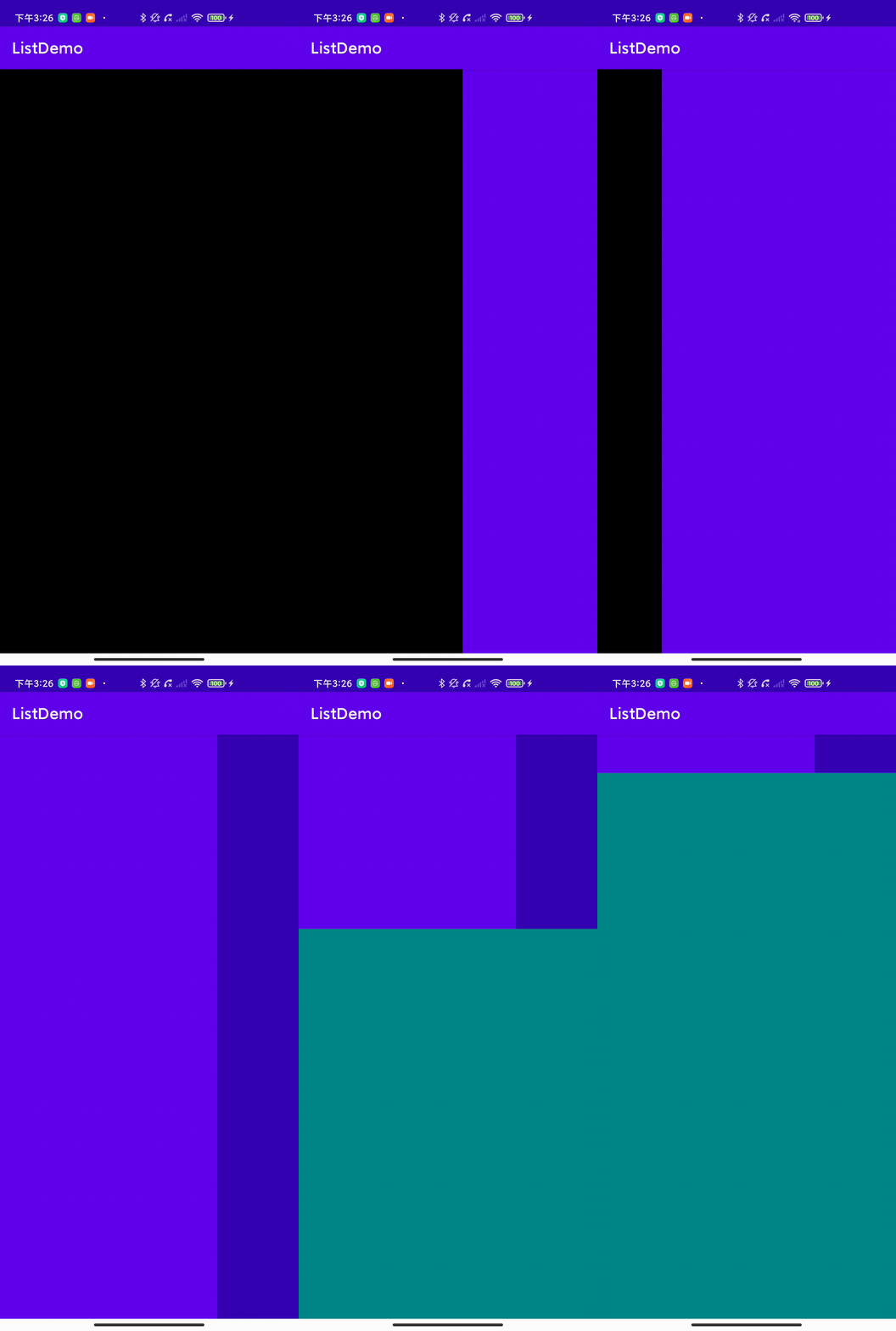
嵌套滑动
如果在ListView中套一个ListView会如何呢?
1
2
3
4
5
6
7
8
9
10
11
12
13
14
15
16
17
18
19
20
21
22
23
24
25
26
27
28
29
30
31
32
33
34
35
36
37
38
39
| <com.example.listdemo.MyListView
android:id="@+id/list1"
android:layout_width="match_parent"
android:layout_height="match_parent"
android:orientation="vertical">
<com.example.listdemo.MyListView
android:id="@+id/list2"
android:layout_width="match_parent"
android:layout_height="match_parent"
android:orientation="horizontal">
<TextView
android:id="@+id/text1"
android:layout_width="match_parent"
android:layout_height="match_parent"
android:background="@color/black"/>
<TextView
android:layout_width="match_parent"
android:layout_height="match_parent"
android:background="@color/purple_500"/>
<TextView
android:layout_width="match_parent"
android:layout_height="match_parent"
android:background="@color/purple_700"/>
</com.example.listdemo.MyListView>
<TextView
android:layout_width="match_parent"
android:layout_height="match_parent"
android:background="@color/teal_700"/>
<TextView
android:layout_width="match_parent"
android:layout_height="match_parent"
android:background="@color/purple_200"/>
</com.example.listdemo.MyListView>
|
我们来分析一下:ViewGroup默认是不拦截任何事件的,也就是说只有在子View不处理点击事件的时候,事件才会传递到父ViewGroup处理;子View如果消费了该事件也就不会有点击事件交给父ViewGroup处理了。
综上,我们可以在事件经过ListView的时候,拦截下需要处理的事件,余下的再传递个子View。
重写onInterceptTouchEvent方法
1
2
3
4
5
6
7
8
9
10
11
12
13
14
15
16
17
18
19
20
21
22
23
24
25
26
27
28
29
| override fun onInterceptTouchEvent(ev: MotionEvent): Boolean {
val intercepted = when(ev.action){
MotionEvent.ACTION_DOWN ->{
onTouchEvent(ev)
false
}
MotionEvent.ACTION_MOVE ->{
val deltaX = lastInterceptX - ev.x
val deltaY = lastInterceptY - ev.y
when (orientation){
Orientation.VERTICAL -> {
abs(deltaY) > abs(deltaX)
}
Orientation.HORIZONTAL -> {
abs(deltaY) < abs(deltaX)
}
}
}
MotionEvent.ACTION_UP ->{
false
}
else -> {
false
}
}
lastInterceptX = ev.x
lastInterceptY = ev.y
return intercepted
}
|
重写onInterceptTouchEvent要注意的是,不能拦截ACTION_DOWN ,不然其之后的一系列事件都会拦截下来,不会传递到子View;拦截ACTION_UP 要慎重考虑,一旦拦截下来,子View的点击事件将不能被触发。
在ACTION_MOVE分支中,我们通过deltaX/Y在X轴和Y轴滑动的距离来判断是否拦截该事件。
值得注意的是:因为我们在没有拦截ACTION_DOWN事件,因此,在子View消耗了该事件之后,我们的父布局将收不到ACTION_DOWN引起的onTouchEvent的调用,会在嵌套滑动的时候产生意料之外的Bug,我的做法是在ACTION_DOWN事件主动调用onTouchEvent方法,将ACTION_DOWN事件传递过去。以上做法经供参考,还有其他的做法。
处理嵌套不只有上述做法,还内部拦截法等方法,详细参见《Android开发艺术探索》3.5节。
效果
参考文章
《Android开发艺术探索》3-4章
简单的ViewPager了解Scroller类 - byhieg - 博客园